
To get started, navigate to settings and scroll down to Zone Management.
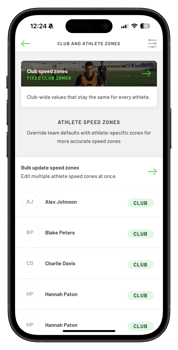
Zone Configuration Types
You can set your athletes into one of three speed zone groups:
- Club: Based on the team average top speed and values are applied to every athlete in the club.
- Individual Absolute: Custom speed values set specifically for one athlete.
- Individual Relative: Calculated as a % of the athlete's recorded top speed.
- NOTE: All new teams will have default club speed zones set.
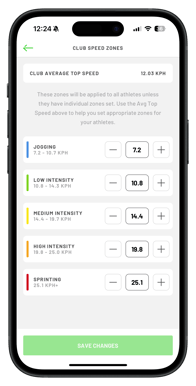
Setting Club-Wide Zones
To apply a speed zones across your entire team:
- Tap the Club Speed Zones bar at the top of the screen.
- You will see the team average top speed displayed for reference.
- Adjust the thresholds for Jogging, Low, Medium, High Intensity, and Sprinting.
- To edit these, type a new value directly into the box or use the +/- buttons.
2. Managing Individual Athlete Zones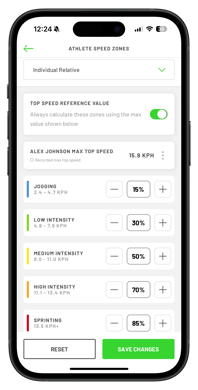
To customise settings for a specific player, select their name from the list on the Zone Management home screen:
- Individual Relative:
- Select this from the dropdown to base zones on the player's personal best top speed. The app displays their max recorded speed; to manually override this, tap the three dots and adjust the speed.
- You can then set their zones as a percentage of the max speed.
- For example, you can set sprinting as 85% of their top speed.
- Individual Absolute: Select this to manually input specific speed values for each zone.
- Once happy with the zones, tap Save Changes.
Bulk Updates: 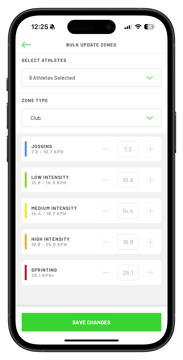
- To update multiple players at once, tap Bulk Update Speed Zones. Select specific athletes or "Select All", choose the desired zone type (Club, Relative, or Absolute), and adjust the values.
- Then tap save changes for the updates to be made
Filtering
The Zone Management home screen displays the active zone type next to each athlete's name.- You can use the filter Icon (top right) to organize your view; for example, viewing only athletes currently assigned to "Club Zones."