
Session Load
A score representing your total energy expenditure during a session - a higher score suggests a player worked harder. 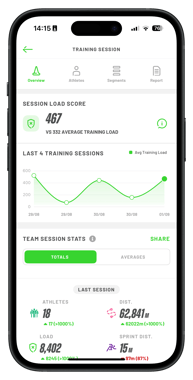
Session Load measures how much energy a player used during a session. It combines two main things at every timestamp:
-
running speed
-
how quickly they change speed (accelerations and decelerations)
From this, we calculate the power output at each moment in the session, measured in Kilojoules (Kj).
By going beyond simple distance or time tracked, this metric offers a comprehensive view of session volume and intensity, showing not just how far an athlete has moved, but how hard they've worked.
Where to view Session Load in the app
Home Screen
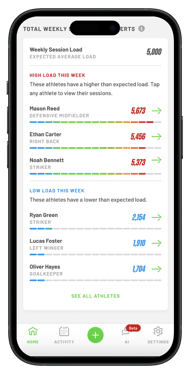
- The Home Screen offers a clear, visual overview of your team’s weekly load. At the top, you’ll see the team’s average Session Load for the week, along with individual athlete load scores.
- Each score is displayed on a colour-coded scale from blue to red, allowing you to quickly identify how each athlete’s load compares throughout the week.
Sessions
- Overview tab
- On the Overview tab, you can view your team's average Session Load score. This provides both the overall team average and a chart tracking team averages across your last four sessions.
- Athletes Tab
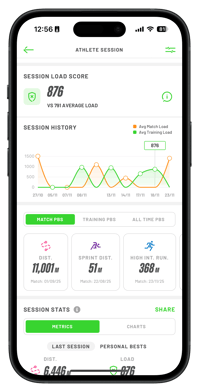
- Here, you’ll find each athlete’s individual Session Load for the selected session. Tap on any athlete to access a chart showing their historical load across training and matches.
- Segments Tab
- For each segment, you’ll see the team average Session Load specific to that segment. The Athlete tab within Segments displays the individual load scores for each athlete in the selected segment.
How does this compare to the Workload Metric?
|
Feature |
Workload (Current) |
Session Load (New) |
|
Measured in |
Relative Values |
Absolute Values (Comparable between everyone and every session) |
|
Scale |
0-10 (Capped at 10) |
0-2000+ |
|
Available Live |
❌ |
✅ |
|
Level Available |
Session Level |
All the way down to segment parts. |