
Why Anchor Setup MattersLPS technology relies on fixed anchor points positioned around the playing surface to calculate athlete position. For the system to deliver precise and repeatable data:
- Anchors must be positioned correctly. (As displayed in the image below)
- Athletes must remain within the defined anchor boundaries.
- Units must maintain clear line of sight to surrounding anchors.
Improper setup can result in reduced accuracy, inconsistent tracking, or gaps in positional data.
Step 1: Determine the Correct Anchor ConfigurationThe optimal number of anchors depends on the size of the playing surface.Full-Size Soccer / Football FieldFor a full-size outdoor field, we recommend a 14–16 anchor setup. For smaller pitches 12 can be used.
- Anchors should be evenly distributed around the perimeter of the field. An Anchor must be positioned in each corner of the playing surface.
- The goal is to create full boundary coverage.
- This ensures consistent triangulation across the entire playing area.
-png.png?width=670&height=363&name=Screenshot%202026-02-24%20at%2022-46-45%20(1)-png.png)
Using fewer anchors on a full-size pitch may reduce positional accuracy, especially in wide or deep areas of play.Basketball Court (Smaller Indoor Surface)For a basketball court or similarly sized indoor surface, the setup can be reduced to:
- 12 total anchors
Because of the smaller playing area, fewer anchors are required to maintain sufficient coverage and signal strength while still delivering accurate data.
Step 2: Anchor PositioningBelow is the recommended perimeter placement guide:In the image above:
- The green Xs indicate optimal anchor positioning when using portable tripod setups.
- Anchors should be positioned around the boundary of the playing surface with corner anchors perpendicular to the adjacent anchors.
- Even spacing is critical, avoid clustering anchors in one area.
- The tripods should be fully extended.
- Tripods should be positioned 2-5m beyond the edges of the field / court to ensure accuracy of tracking athlete activity on the edges of the playing surface. This is important as anchor signals can be at their weakest on the boundary due to the number of anchors interacting with the athlete's unit.
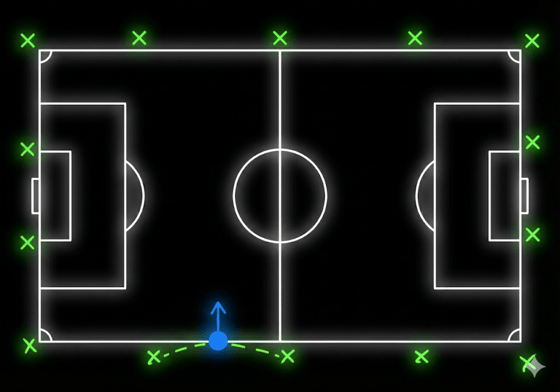
- All anchors must be facing towards the playing surface.
Key Positioning Principles
- Anchors must create a clear boundary around the entire playing surface.
- They should be positioned outside the field of play.
- Maintain consistent height when mounted on tripods.
- Ensure no physical obstructions block the signal path.
Step 3: Correct Anchor Initialization ProcessProper initialization is just as important as physical placement.Before Powering On
- Ensure all anchors are in their final physical positions.
- Confirm tripods are stable and secure.
- Verify there are no obstructions between anchors.
- Anchors should not be moved before the end of the session. Ensure the session time has elapsed before they are packed away.
 Anchors should not be powered on while being moved or repositioned.
Step 4: Athlete Boundaries & Line of SightDuring the session, athletes must remain within the boundary created by the anchors.As shown in the diagram:• The GPS/LPS units must maintain clear line of sight to the surrounding anchors.• Stepping outside the perimeter may result in:Reduced positional accuracy / Data dropouts / Incomplete tracking / Important Considerations
- Avoid setting anchors in areas where walls, structures, or equipment block signals.
- Ensure athletes do not warm up or train outside the anchor boundary if data collection is required.
- Ensure athletes or coaches that are not active in the session do no obstruct the anchors direct sight of the active athletes.
- If anchors do become obstructed or moved ensure they are correctly repositioned and obstructions are removed as soon as possible.
- For best results, anchors should form a consistent and complete perimeter around the active playing area.
Summary of Best PracticesTo ensure accurate and repeatable LPS data:
 Use 14–16 anchors for full-size soccer/football fields Use 12+ anchors for basketball courts or smaller indoor surfaces Position anchors evenly around the perimeter Set up anchors fully before powering them on Power on anchors sequentially, starting at 0 Keep athletes within the anchor boundary Maintain clear line of sight between units and anchorsFollowing these setup and initialization best practices will help ensure high-quality positional data and consistent performance reporting across all sessions.