
Edge Sync Timeouts
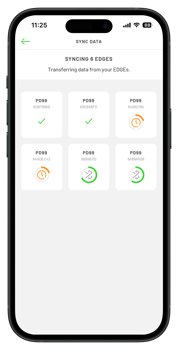 Any units that time out during a sync will display a new orange icon on screen and are queued to retry to sync.
- The orange icon will cycle through 4 stages.
- Sync timeouts are caused by poor Bluetooth bandwidth. This is most commonly due to too many active Bluetooth connections or an older device.
- Once the retry is successful, the unit will display a green tick to confirm the sync has completed.
-
This update is available from app version 58.0.0
A few things to try before your next sync:
- Toggle Bluetooth off and on, waiting 10 seconds in between.
- Unpair devices (select "Forget This Device") for any non essential pairings.
- Check your phone software is up to date
- Clear Bluetooth cache: Android via Settings > Apps >> Bluetooth > Storage > Clear Cache. iPhone: Restart the device
Syncing a large number of units:
-
Syncing in smaller batches can also help. Turn off half the devices and sync the other half at a time, as this can significantly reduce timeout rates.
-
Stay on the sync screen throughout the process. If the app crashes while syncing 50+ devices, this may indicate corrupt cached files. Restarting the device should clear these, and is especially worth doing if the device isn't switched off regularly.
- If the timeout issue persists please contact our support team support@playerdata.com