
To begin using CoachMate in-app use the following steps;
- Open the PlayerData app
- Navigate to CoachMate tab by tapping the CoachMate icon in the bottom navigation bar of the app.
- Select a tab to start;
- Onboarding: The Onboarding function requires the user to answer two questions (What are your club's goals for this season? and What competitive level is your club?). With these two answers CoachMate can provide responses tailored to your specific context.
- Session Creation: The Session Creation function converts coach inputs (theme,
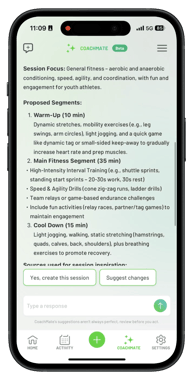
duration, date, participants, and optional drills) into a complete, structured training session. It interprets intent, designs a logical progression (warm-up, main drills, game-related application, cool-down), and incorporates provided drills. The output is a clear, coach-ready session outline for confirmation or adjustment
-
- Session Planning: The Session Planning function uses performance goals, sports-science principles and a proactive research agent to create a detailed, evidence-based training session that includes components such as warm-ups, targeted conditioning, sport specific drills, and active recovery strategies. It organizes the plan logically and provides rationale for each segment, enabling coaches to deliver high-quality, research-driven training. CoachMate also saves this session plan for future reference and use.
- Session Summary: The Session Summary provides a concise, two-part post-session review of an individual athlete's performance. This will be available both in the session overview screen, as well as in CoachMate. It features a detailed breakdown of quantitative physical data (e.g., Total Distance, Sprint Distance, High Intensity Distance) and interpretive text. This text translates the data into actionable insights, highlighting the player's work rate, identifying effort gaps, and offering contextual explanations for the observed workload. The function concludes by prompting for deeper analysis, such as a segment-by-segment breakdown or comparative data.
-
- General Analysis: The General Analysis feature is a comprehensive, multi-athlete
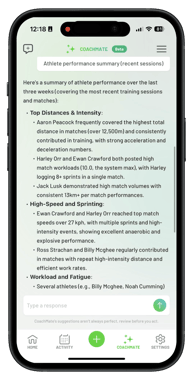 reporting tool for coaches to quickly assess team performance and identify individual trends. It allows ranking all players in a session by customizable metrics (e.g., distance, high-intensity distance, workload score) for comparison and squad ranking. The tool calculates team averages to establish a performance baseline against the training objective. It also flags athletes whose metrics significantly deviate from the team average or their typical intensity, alerting the coach to potential over-exertion or under-performance needing follow-up.
 - Support: The Support function is designed to provide comprehensive assistance across the app. The function is available to answer specific questions about the platform’s features and guide users on system effectiveness. This covers practical tasks such as setting up sessions, running reports, exporting data, or understanding the definition and calculation of any metric, providing detailed assistance or relevant documentation links as needed.
4. Upon completion of a chat, a New Chat icon, positioned in the top left, redirects you to the CoachMate home screen, where you can select from either 5 [re-defined functions, or immediately ask anything new in the chat box. - General Analysis: The General Analysis feature is a comprehensive, multi-athlete
- 5. If the user wishes to access previous chats, Chat History is accessible through the "Hamburger Menu" in the top right of the interface.
- 6. If CoachMate is used to create a session each will be tagged with a green "CoachMate" chip, distinguishing it from manual entries.
Other useful aspects of CoachMate to note:
- "Thinking" State: At times CoachMate may take a moment to process your request, so we can gather all the relevant data and context to provide a high quality answer.
- Rich Text Linking: CoachMate responses can include hyperlinks, for example, source citations when a session plan is created, or a direct link to a session it is creating or summarising.
- Session Summaries: The AI can generate concise, text-based summaries of completed sessions, highlighting key performance metrics (e.g., "Strong high intensity metrics...").
- Quick Replies: Pre-populated responses positioned above the chat box to maximize efficiency of chat interactions.
- Copy Tool: Positioned near the 'thumbs up' / 'thumbs down' icons, allows users to copy session plans or summaries for easy sharing via text or email.
- Response Rating: You can rate every response using a Thumbs Up or Thumbs Down. Rating sessions will help us monitor the effectiveness of CoachMate responses.