
Pitches are now automatically detected once you sync your data after a match session.
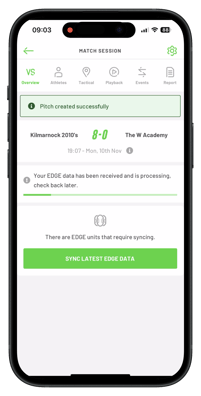
Automatic pitch detection is now available for all non‑live match sessions.
Start by creating your session in the app—there’s no need to manually select a pitch at this stage.
- Once your session is complete and your data has been synced, the app will process your information.
- If a pitch is detected, a green banner will appear at the top of the screen with the message ‘Pitch detected successfully.’
- If a pitch is detected, a green banner will appear at the top of the screen with the message ‘Pitch detected successfully.’
- Your session data, including tactical maps and playback, will be available in the app.
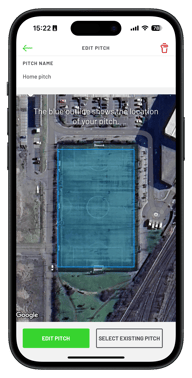 In session settings, you can see the pitch details. If you wish to rename it, tap ‘Edit Pitch,’ enter the new name, and save.To view the detected pitch, tap the settings icon in the top right and select ‘Detected Pitch.’
- The renamed pitch will be added to your pitch library and used automatically for all future sessions held on that pitch.
Note: This feature is available for all outdoor field sports.